On this page
- Before you touch anything: bypass and unplug
- What each code means
- Err01, Err03, or Err04: reseat the wiring first
- The code came back: find the part that failed
- Err05: the control board
- Err07, Err08, or Err09 on a Morton M45C
- A code or message that isn't on this list
- No code, but the water is hard again
- Repair it or replace it?
On an EcoWater or Morton softener, Err01, Err03, and Err04 share one meaning. Something may be wrong with the wiring harness or switch, the valve, or the motor. Both companies publish the same first fix, and it costs nothing: bypass the softener, unplug it, and reseat the wiring.
Err05 points to a possible fault in the control board. Err07, Err08, and Err09 appear only on the Morton M45C and concern its built-in water shut-off valve. For Err01 through Err05, Morton's support page gives the same meanings and reset steps as EcoWater's, word for word. One guide covers both brands.
Before you touch anything: bypass and unplug
You come down in the morning, the display is blinking a code, and the water feels hard. A code can appear partway through a recharge, the softener's cleaning cycle. The valve may have stopped with water still flowing to the drain. Make it safe first.
- Push the bypass handle in. On these models it's on the back of the unit, where the house pipes connect. Pushed in, it sends water around the softener, so the house keeps running water while you work.
- Unplug the power supply from the outlet. The board, the motor, and the switch all sit under the top cover, and you'll be handling their plugs.
- Lift off the top cover. Look for water on top of the valve before you go further. Both support pages warn that water there can mean corrosion on the motor or switch underneath.
What each code means
Find your code, then tap it to jump to the fix.
- Err01, Err03, or Err04 (often called error code 1, 3, or 4)
- A possible fault in the wiring harness or switch, the valve, or the motor. The support pages give all three one meaning and one fix.
- Err05
- A possible control board malfunction.
- Err07, Err08, or Err09
- Morton M45C only: a problem with the built-in water shut-off valve.
- Err02, Err06, or a code or message not listed here
- Neither support page lists Err02 or Err06. For these and anything else, your own owner's manual is the authority.
Err01, Err03, or Err04: reseat the wiring first

Inside the cover, a small motor turns the valve through each stage of the recharge. A plastic wheel the support pages call the cam and gear turns with it, and a small switch clicks as its notches pass. The board counts those clicks to know where the valve is. When they don't arrive as expected, the softener stops and shows a code.
A loose plug is the cheapest cause, so start there. With the softener bypassed, unplugged, and the cover off:
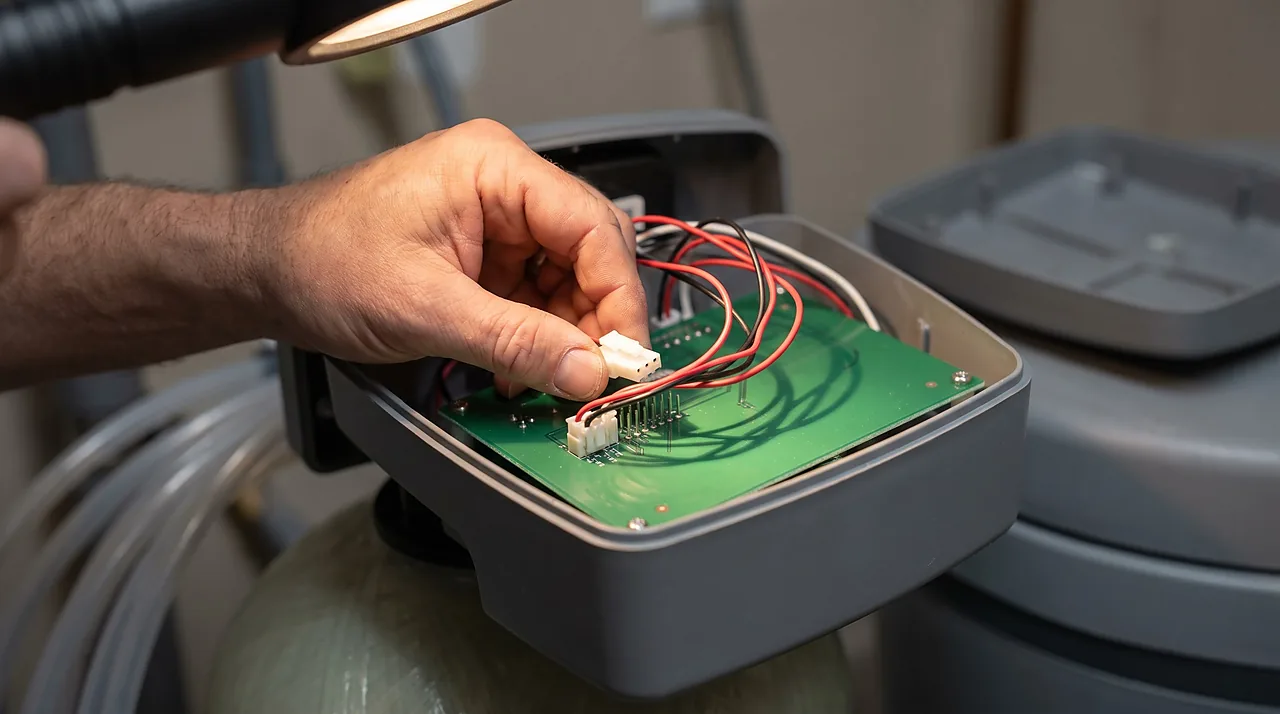
- Check that every wire is plugged in tightly. If you find a loose one, push it back on and plug the power supply back in. The support pages say the code should then be gone. If it is, you're done. If not, unplug it again and carry on.
- Look at the control board for rust or corrosion. Salty, damp air around a brine tank is hard on electronics.
- Reset the two board connectors. Unplug the white plastic switch connector. Then, on the back of the control board, unplug the red wire harness connector, the one with five wires. Leave both unplugged for 10 seconds, then plug them back in.
- Confirm the motor cable is snapped in securely.
- Plug the power back in and watch the display for several minutes. The valve first searches for its home position, the starting point of its cycle, and a code can return during that search.
If the display stays clear, pull the bypass handle back out to return the softener to service. If the code comes back, the next step narrows down which part failed.
The code came back: find the part that failed

Both support pages walk through a short test of the valve. It's a set of yes-or-no questions, and each answer narrows the suspects:
- After you plug the power back in, does the motor run nonstop for more than a minute?
- Then it has power. Look through the inspection opening to see whether the cam and gear is turning. Your owner's manual shows where that opening is.
- Is the motor silent?
- Hold the Recharge button for a few seconds. If the motor starts, watch whether the code returns over the next several minutes.
- If it stays silent and you own a multimeter, check the voltage reaching the motor while you hold the button. Your owner's manual shows where to place the probes. The support pages say a working board shows 24 to 29 volts. Voltage there but no movement points to the drive motor, and no voltage points to the board.
- Motor running, but the cam and gear isn't turning?
- Something between the motor and the valve has slipped or jammed, for example worn gear teeth or a valve binding inside. That's a gear or valve repair, so a new motor won't fix it.
- Cam and gear turning, and the code still returns?
- Test the switch. Hold the Program button until "000" appears, then watch the switch symbol on the display as the cam and gear turns.
- If the symbol flicks between open and closed, the switch works and the valve is hunting for its home position. If the code returns over the next several minutes, both support pages say to replace the control board. If the symbol never changes, suspect the switch or its harness.
You hear the motor running, so you buy a motor, and the code comes straight back because the switch was the problem all along. Working through the questions in order keeps you from buying parts you don't need.
Err05: the control board
Err05 points to a possible fault in the control board itself. Run the same reset anyway, since a loose plug or a corroded connector costs nothing to rule out.
Then look closely at the board. Green or white crust on its connectors, or water sitting on top of the valve, can explain a board failure. Find where that water comes from before you replace anything, or a new board can corrode the same way. A leak from the valve itself is covered in water softener leaking.
If the code survives a clean, dry reset, the board is the likely culprit. On an older softener, price the board against a whole new unit before you order.
Err07, Err08, or Err09 on a Morton M45C
These three codes exist only on the M45C, which has a water shut-off valve built in. Morton's support page ties them to that shut-off valve and sends owners to a separate shut-off valve troubleshooting article. The wiring reset for the other codes isn't the documented fix here, so follow that article or call Morton support before replacing parts.
A code or message that isn't on this list
If your display shows something not covered here, find the model number, often on a label under the salt lid. Then use the troubleshooting chart in the owner's manual for that model. If you searched for an error code PDF, that manual is the one to find.
Older and commercial controls can use their own codes, and some older displays show a shorter form such as E5. Their meanings come from that model's manual. A guess from another model's list can send you after the wrong part.
Connected models can also show plain-text alerts. A message like "possible water flow to drain detected after recharge finished" isn't an error code. Read it literally: water may still be running to the drain after the cleaning cycle ended. Check whether the drain hose is still flowing, and if it is, see softener stuck in regeneration.
Other brands keep their own lists. Culligan owners can use our Culligan error codes guide, and Whirlpool and GE cabinet units have their own recharge and reset steps.
No code, but the water is hard again
A clear display doesn't prove the softener is working. If spots and scale are back and the salt level hasn't moved in weeks, start with water softener not softening. Cabinet-style units, where the salt and the resin share one housing, have their own common faults in cabinet water softener problems.
Repair it or replace it?
The parts behind these codes are a switch, a harness, a motor, a cam and gear, the valve, or the board. The small parts usually cost less than a board, so check current part prices. A new softener with professional installation typically runs about $1,000 to $3,000, and prices vary by region.
On chlorinated city water, resin typically lasts about 10 to 15 years. A softener that old may need new resin soon as well. When an old unit needs a board, that's the moment to weigh repair or replace.
Read next


Questions people ask
Does unplugging the softener clear the error code?
It may clear the display for a while. If the cause is a loose plug, a worn switch, or a stuck valve, the code comes back. That often happens within minutes, while the valve searches for its home position, or at the next recharge. The connector reset helps more, because it reseats the plugs as well.
Can I keep using water while the code is showing?
Yes, with the softener in bypass. The house gets hard water until the code is cleared. Bypass also keeps a softener that stopped mid-recharge from sending water to the drain.
Is Err03 worse than Err01?
The support pages don't rank them. They give Err01, Err03, and Err04 one shared meaning and one shared fix. If your model's owner's manual gives a narrower cause for each code, trust the manual.
Do I need an EcoWater dealer or Morton support to fix these codes?
Not for the reset or the valve test. Both are published by the manufacturers for owners. Call for help if the test points to the board and the unit is under warranty. It also makes sense if you'd rather not open the cover.
Sources
- EcoWater Systems, "Error Code (Water Softener)" support article
- Morton, "Error Code" support article